Product Notes
What Explore Does: Every Week's Tournaments on One Screen
Explore puts the week's new ITF Juniors and Tennis Europe events on one screen — each with a fact sheet and a Decision Score — so a family can see what's on before deciding where to enter.


Ask a tennis parent how they find out what's on next week, and you'll usually get a slightly sheepish answer. A bookmarked federation page. A WhatsApp group. A coach who mentioned something in passing. A PDF somebody forwarded back in March that may or may not still be current.
The junior circuit does not publish itself in one place. It never has. The events exist, the dates exist, the entry deadlines exist — they're just spread across sites that were each built to do one job for one organisation, none of which was "show a family what to play this week." So the family stitches it together by hand, badly, at night, and hopes they haven't missed anything.
Explore is the screen we built so they don't have to.
What Explore is
Explore is NextPoint's tournament-discovery screen. Its whole job is to answer one question — what's on? — for the events a junior player actually enters.
Each week it surfaces the new ITF World Tennis Tour Juniors and Tennis Europe events, laid out as a feed of cards. One card per event. You scroll the week the way you'd scroll anything else, except everything on the screen is a real tournament you could plausibly enter, with the information you'd want to judge it sitting right there on the card.
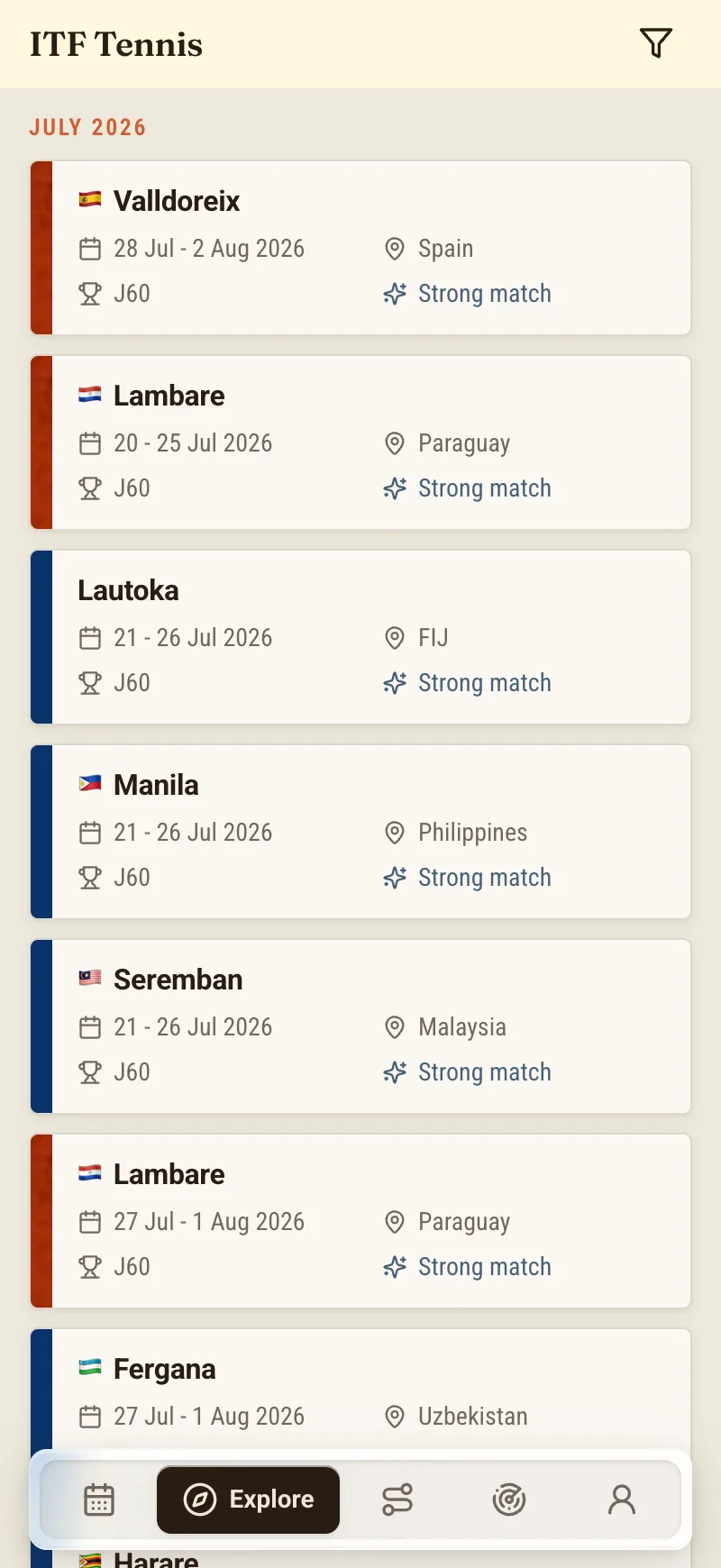
That's the shape of it. Now the parts.
Reading a card
Open Explore and the first thing you see is a stack of events, each one condensed to what matters at a glance. A card is meant to be legible in the half-second before you decide whether to stop on it.
Every card carries the same anatomy:
- The location and date line. A single line reads City, Country · dates · surface — where it is, when it is, and what it's played on. That's the sentence a parent says out loud when they're weighing a trip, so it's the sentence we put first.
- The colour rail. Down the left edge of each card runs a coloured rail that codes the surface and category, so the eye can sort the feed before the brain reads a word of it. After a week of using it you stop reading the rail consciously and just start noticing the clay swatch you were looking for.
- The grade badge. Each card wears a badge for its level. For ITF Juniors that's the grade — J30, J60, J100, J200, J300 — climbing from entry-level events up to the ones that anchor a serious junior's season. For Tennis Europe it's the event category, plus the age group it's run for: U12, U14, U16. The badge is how you tell in an instant whether an event is even in the right neighbourhood for your player.
None of this is exotic. It's the same handful of facts a coach would ask for anyway — level, surface, where, when — arranged so you don't have to go digging for them one tab at a time.
The fact sheet
The card is the summary. Behind each one sits a fact sheet — the fuller picture for a single event, in one place.
This matters more than it sounds. The details that decide whether an event is worth entering — the surface and ball, the category, the entry fee, and the string of deadline dates that govern the whole thing — normally live scattered across a federation site and a PDF or two. On Explore they live on the event's fact sheet, so the thing you're deciding from and the facts you're deciding on are in the same place.
If the vocabulary on a fact sheet is unfamiliar — entry deadline, freeze, withdrawal, sign-in, the acceptance list itself — that's a whole subject of its own, and I've walked through it start to finish in how ITF junior entry actually works. The short version: the fact sheet is where you read the event before you commit to it.
The Decision Score
Then there's the number.
Every event on Explore carries a Decision Score out of 100, paired with a plain-language verdict and an entry-chance estimate. The number gives you a fast read. The verdict — something like worth considering, weigh it against your other events — tells you what the number means in words, so nobody's left guessing whether a 64 is good. The entry-chance estimate answers the question every parent actually wants answered: realistically, would we even get into the draw?
A few things I want to be plain about, because they're the whole point.
The Decision Score is an honest estimate, not an oracle, and it is emphatically not a "fit score" — it's not grading how much your player will like the event. It's weighing whether the event is worth entering, right now, for this player, against everything else on the table. The entry-chance figure is an estimate, not a guarantee. The acceptance list keeps moving until it doesn't, and no honest tool will promise you a spot on it. When the field is too unpredictable to say anything responsible, the score would rather show you less than print a confident number over nothing.
If you want the machinery under the number — what goes into it, what it deliberately leaves out, and how to use it without over-trusting it — my colleague Sofia took it apart in what a Decision Score actually measures. For the purposes of Explore, treat it as a tie-breaker and a conversation starter. When two events overlap and you can only play one, the score and its verdict give you a specific reason one edges ahead, which is a far better place to start a chat with a coach than "I just have a feeling about the clay one."
What Explore does not do
Here is the line I never want blurred: Explore finds tournaments. It does not enter you in them.
NextPoint is discovery and decision support. It does not enter you, it does not pay your entry fee, and it does not withdraw you. When you've found an event worth playing, the actual entry happens where it has always happened — on the federation's own portal, through the player's own account, before the real deadline. Explore gets you to a confident yes, this one; the federation portal is where that yes becomes an entry. We are deliberately on your side of that line, not standing between you and the ITF.
So the flow is honest and simple. Scan the week. Stop on the cards that fit. Open the fact sheets on the ones worth a closer look. Shortlist the two or three that survive that read. Then go and enter them, yourself, on the portal that runs them.
What's in the feed, and what isn't
Explore is scoped on purpose, and it's worth being straight about the edges.
It covers ITF World Tennis Tour Juniors and Tennis Europe — the two circuits a junior building an international schedule actually plays. ATP and WTA events can appear too, but for reference only — so you can see where the pro calendar sits alongside the junior one, not because a junior is entering them. What Explore does not cover is the national federations — no USTA, no FFT, none of the domestic tours. Those are their own worlds with their own systems, and pretending otherwise would just be a way to disappoint you.
One more thing, said once and meant plainly: NextPoint reads from ITF and Tennis Europe as data sources, not as affiliations or endorsements. We surface their events because that's where the junior season lives. Neither organisation runs, reviews, or endorses NextPoint, and the official word on any event — its real dates, fees and rules — always belongs to them.
Where this leaves you
Strip it back and Explore does one unglamorous thing well: it puts the week's junior tournaments on a single screen, in a form you can actually read, so the decision about where to play starts from information instead of from a WhatsApp rumour.
- The feed shows the week's new ITF Juniors and Tennis Europe events, one card each.
- The card carries the location-date-surface line, the surface-and-category colour rail, and the grade or age-group badge.
- The fact sheet holds the fuller detail — surface, ball, category, fee, deadlines — in one place per event.
- The Decision Score hands back an out-of-100 read with a plain-language verdict and an honest entry-chance estimate.
- You shortlist what fits and enter it on the federation portal, which is the only place an entry is ever real.
What used to be an evening of open tabs becomes a scroll and a couple of fact sheets. The tennis was never the hard part. Finding out what's on, and deciding what's worth the trip, was — and that's the part Explore is built to take off your plate.
NextPoint is in early access. If a calmer way to see the week sounds like something you'd use, you can join the waitlist.
About the author
Daniel Okonkwo is a former touring professional who writes on life on the junior circuit at NextPoint. He spent enough years finding out about tournaments the hard way — a forwarded PDF, a coach's offhand remark, a deadline discovered too late — to appreciate a screen that just tells you what's on.