Product Notes
Meet Radar: A Daily Change Feed for Your Tournaments and Players
Radar is a once-a-day digest of what changed on the tournaments and players you follow — deadlines coming up, list movement, watched players entering — sorted into what needs action now and what you're just keeping an eye on.


I used to have a browser tab I was slightly ashamed of. It was a federation entry list, and I would open it far too often — before breakfast, in the car park before a lesson, once memorably at a wedding — to see whether anything had moved. Had the deadline for that event in the Netherlands crept closer? Had my daughter climbed off the alternate list? Was there a withdrawal deadline I was about to sleep through? I never knew, so I kept checking. Checking a thing that changes maybe once a day, ten times a day, is not diligence. It is just anxiety wearing a productivity costume.
The honest problem is that the information a tennis parent needs is real, it matters, and it is scattered across pages that were never built to tell you what changed since you last looked. So you either check obsessively or you miss things. For a long time those felt like the only two options.
Radar is our attempt at a third one.
What Radar actually is
Radar is a daily change feed for the tournaments and players you follow. That's the whole idea, and I want to keep it that plain, because the moment a feature starts sounding clever is usually the moment it stops being useful.
Here is how it works in practice. You shortlist events you're interested in and plan the ones you're serious about — the ordinary business of building a season. Radar watches that list quietly in the background. Once a day, it looks at everything you follow, compares it to yesterday, and hands you a short summary of what actually changed. Not the whole list again. Not a wall of data you have to re-read to find the one thing that moved. Just the difference.
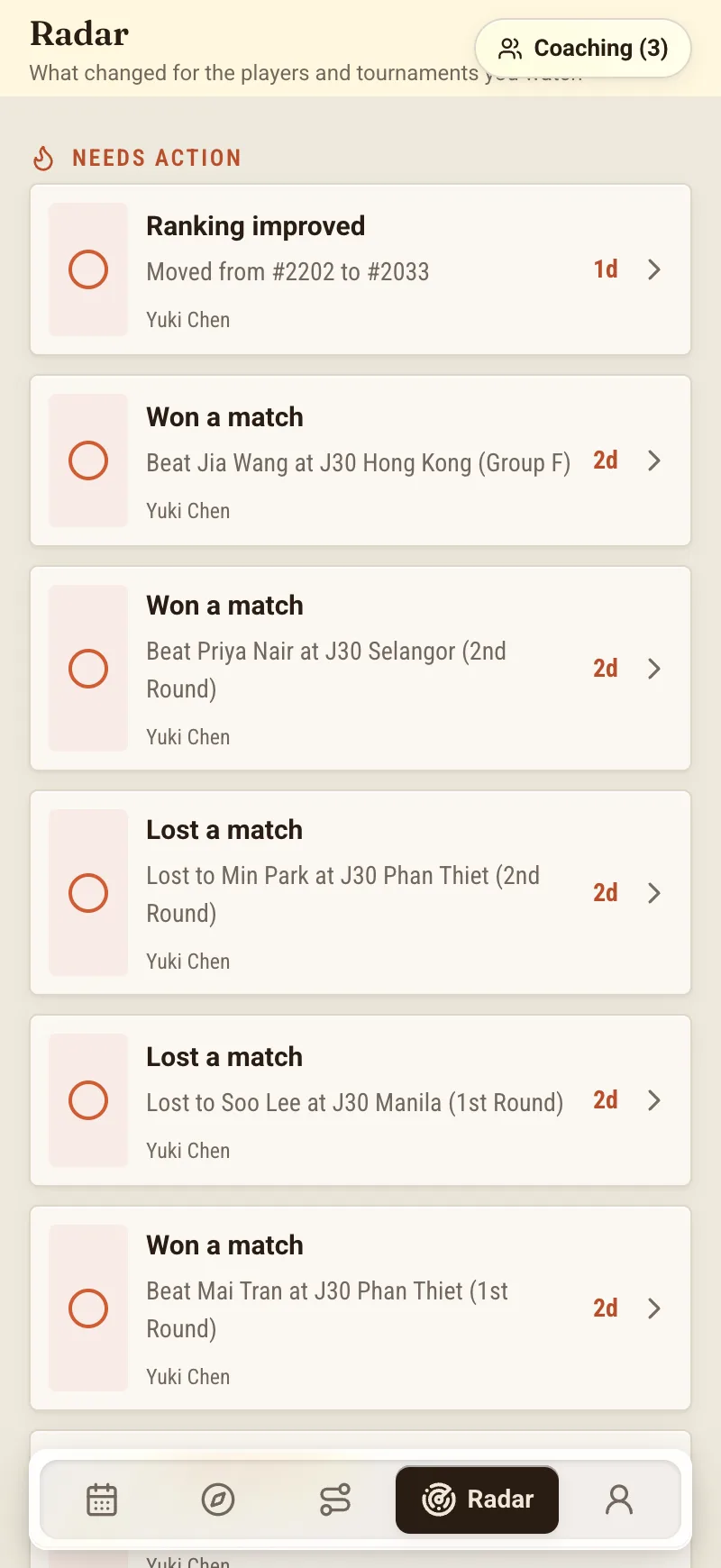
That's the part I'd underline. Radar's job is to tell you what is new, so that on the mornings when nothing has changed — which is most mornings — you get to close the app and go make coffee. The relief of that is hard to describe until you've lived on the other side of it, refreshing a page that had nothing new to say.
The three things it watches for
Radar pays attention to three kinds of change, and they map almost exactly onto the things I used to open that shameful tab to check.
Deadlines coming up. Entry deadlines, withdrawal deadlines, sign-in deadlines — the dates that quietly decide whether your child is in an event or not. These are the ones that punish you for looking away, because a missed entry deadline doesn't lower your odds, it removes you from the calculation entirely. Radar surfaces them as they approach so a Tuesday with three deadlines on it arrives as a heads-up, not a discovery you make too late.
Acceptance-list movement. Lists on this circuit move constantly as players withdraw and the field reshuffles beneath them. If your junior climbs the alternate queue — the exact movement that turns a distant-looking spot into a live chance — Radar tells you. You find out you've moved up without sitting on a federation page at midnight watching for it. If you've never quite made peace with why an alternate position is a genuinely hopeful place to sit, I wrote about the numbers behind that in The 60% Rule; Radar is the tool that lets you actually ride that pattern instead of just knowing about it.
Watched players entering events. You can follow players as well as tournaments — a rival your child keeps drawing, a hitting partner, someone a notch ahead whose schedule tells you where the level is heading. When a player you watch enters an event, that shows up too. It's a quieter signal than a deadline, but over a season it's genuinely useful for reading the landscape your child is competing in.
Needs action, or just watching
The feature I didn't know I wanted, and now can't do without, is that Radar sorts.
Not every change is the same kind of change. A withdrawal deadline three days out is a thing you have to do something about. A watched player entering a tournament in six weeks is a thing you just want to know. Lumping those together in one undifferentiated list is how you end up either ignoring the feed or panicking at all of it — and I've done both.
So Radar splits the day's items into two buckets: what needs action now, and what you're just watching. The needs-action items are the ones with a clock on them — a deadline you can still hit, a decision the calendar is forcing. The watching items are context — movement and entries you'll want in your head but don't have to act on this morning. It means you can open Radar, deal with the short urgent list, glance at the rest, and get on with your day. The sorting does the triage I used to do badly in my own head at six in the morning.
Reminders that get louder as the date nears
Deadlines get a bit of special treatment, because they're the changes that hurt most when missed.
Rather than telling you about a deadline once — which you will forget — or telling you every single day, which you'll learn to ignore, Radar escalates. A deadline reminder gets more prominent as the date approaches, surfacing at roughly 14 days out, then 7, then 3, then 1. Fourteen days is a gentle "start thinking about this." One day is a "this is happening tomorrow, decide now." The reminder grows in urgency at the same pace your actual stress about it does, which feels like the right design — it matches the shape of how these things sit in a parent's mind.
And if you want it to, Radar can push these to your phone, so the day-of reminder reaches you even when you haven't opened the app. I'll admit I was wary of another thing buzzing at me. In practice, a single well-timed nudge the day before a withdrawal deadline has saved me more than one awkward conversation, and it's a far cry from the ten-times-a-day refreshing it replaced.
What Radar is not — and this matters
I want to be careful here, because it would be easy to oversell this, and an overpromised tool is worse than none.
Radar is a once-a-day digest of changes. It is not live scores, and it is not live streaming. It won't tell you the score in a third set, it won't tell you your child just got broken, and it isn't a real-time window into a match. It's a summary of what changed on your lists — deadlines, list positions, entries — refreshed daily. If you're looking for point-by-point, Radar is the wrong tool and I'd rather tell you that plainly than let you find out at a disappointing moment.
It is not a live federation integration, and it does not make anything official happen. Radar reads from ITF and Tennis Europe as data sources — that's where the deadlines and list movement come from — but a data source is not an affiliation or an endorsement, and I'll only say that once. NextPoint doesn't enter you into events, doesn't withdraw you, and doesn't pay your fees. Those actions live on the federation's own systems, and they remain yours to do. Radar tells you a deadline is coming; you're still the one who acts on it.
And everything Radar shows is a reflection of source data, never a guarantee. Because it reads from those feeds and reports what it sees, the figures can lag the official portal — a list position or a deadline might show up in Radar a little behind where the federation has it. When something genuinely matters — the difference between playing and not playing that week — the federation portal is the source of truth, full stop. Radar is there to point you at the things worth checking and to stop them slipping past you. It is not there to be the final word, and it won't pretend to be. Treat it as the smart, tireless assistant that says "look at this today," not as the ledger.
None of that is fine print I'm burying. It's the honest shape of the thing, and knowing it is what lets you trust the parts that do work.
Where it fits in a season
For most of a junior season, the administrative side is the parent's lane — the deadlines, the entries, the tracking that is nobody else's job and definitely not the player's. Radar is built to carry the watching part of that lane so you don't have to hold it all in your head or in a shamefully over-refreshed browser tab.
It pairs naturally with the rest of the honest reading of a list. If the vocabulary of acceptance lists still feels slippery — direct acceptance, qualifying, alternate, and why the whole thing moves — start with Reading an Acceptance List, then let Radar do the daily watching once you've made peace with what you're looking at. The article teaches you to read the list; Radar makes sure you never have to remember to.
We're in early access. If you'd like the deadlines and the list movement to come to you once a day — sorted into what needs doing and what's just worth knowing — instead of living in a tab you check too often, you can join the waitlist.
I still have that federation page bookmarked. I just don't open it before breakfast anymore. That, honestly, is the whole point.
About the author
Tom Vance is a junior coach and tennis parent who writes on the family side of competitive tennis for NextPoint. He spent years treating a federation entry list as something to be refreshed hourly, and is quietly relieved to have found a saner way to keep an eye on a season.