Product Notes
Filtering to Your Shortlist: Grade, Surface, and Dates in Explore
Explore surfaces dozens of new junior events every week. Grade, surface, and dates are the three cuts that turn that flood into a shortlist a player can actually act on.


Open Explore on a Monday and the week has already refilled. Dozens of new ITF Juniors and Tennis Europe events, freshly listed, sitting in a long column. Different countries. Different surfaces. Different entry deadlines, some closing in ten days and some in six weeks. Different costs, though the cost never shows up in the title. It is a lot of tournament, and none of it is sorted for your player.
I have watched families try to read that column top to bottom. It does not work. By the fortieth event your eyes have glazed, you have forgotten the good one you saw near the top, and you are entering something because it appeared twice, not because it fits. The scroll is not a plan. It is a way to feel busy while deciding nothing.
The list is not the problem. A big list is a good thing — it means options. The problem is reading it as a list. What you actually want is a shortlist: five or six events that fit this player's level, this player's surface, and this player's calendar, small enough to think about properly. Getting from the flood to that shortlist is what the filters are for.
Three cuts, in order
Filtering sounds like a small thing. It is not. It is the difference between a decision and a scroll.
There are three filters that do most of the work, and it helps to apply them in a rough order: grade or category first, because it settles who your player would actually be playing; then surface, because it settles whether the week suits their game; then dates and deadlines, because it settles whether the week is even open to them. Each cut takes the list down. By the third, you are usually looking at something you can hold in your head.
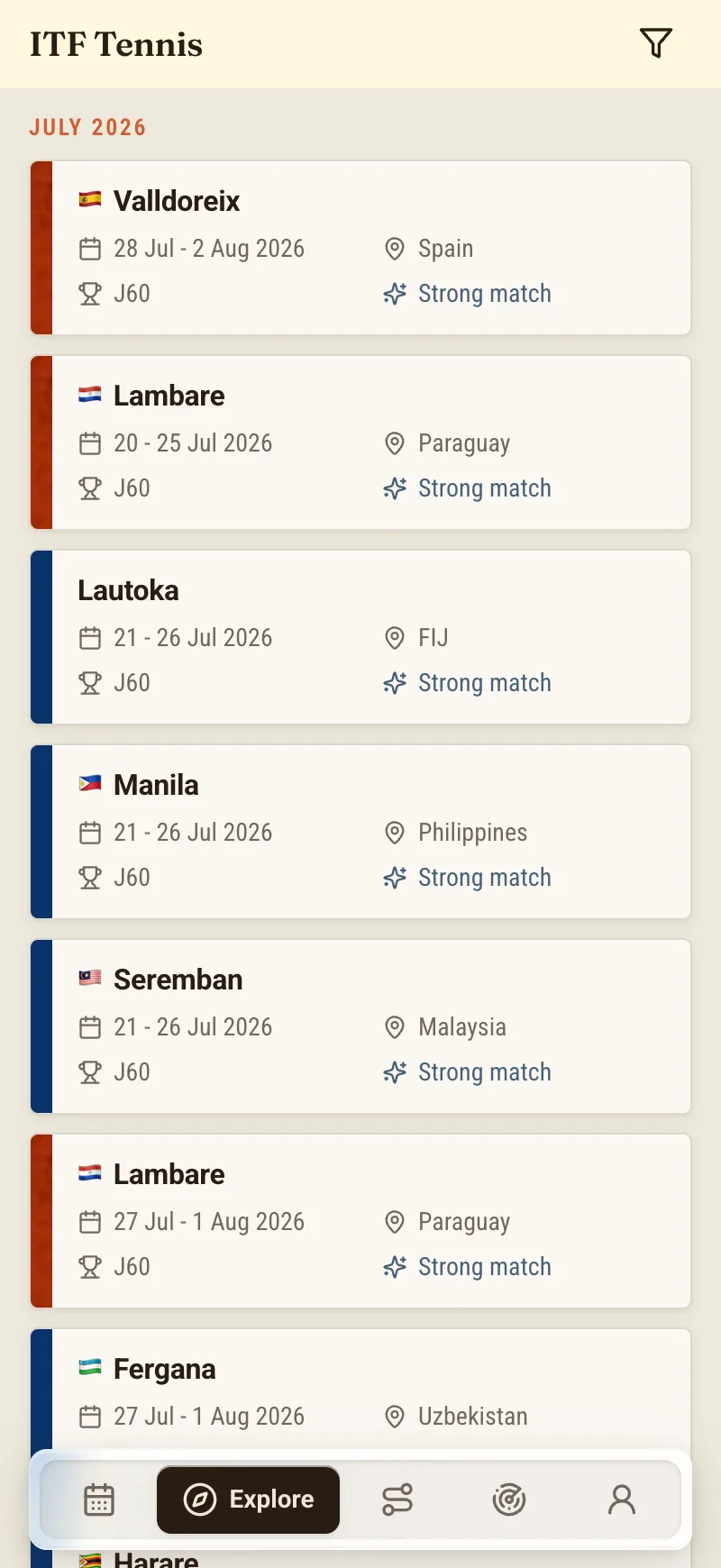
None of this is clever. It is just narrowing on purpose instead of hoping the right event floats to the top.
Grade and category: match the player, not the ambition
Start with grade, because it is the filter people most often get wrong.
On the ITF side you can narrow by grade — the ladder that runs from J30 at the entry end up through J100, J200, and on to J300. Below that sits Tennis Europe, filtered by its own categories and by age bracket: the U12, U14, and U16 years where most younger juniors actually belong before an ITF ranking is the right frame at all. Pick the band that matches your player and the list stops showing you tournaments that were never really for them.
Here is the temptation the grade filter exists to resist. The instinct is to set the floor high — to filter for the biggest events the player is technically eligible for, because the bigger name feels like progress. It usually isn't. Entering well above your level mostly buys a first-round exit: a long trip, one match against someone two tiers stronger, and a weekend gone. The grade label is a promise about who else is in the draw, and a grade too high is a promise you cannot keep on the day.
The reverse is just as real. Filter too low and your player wins comfortably against fields that ask nothing of them, which feels nice and teaches little. The grade you want is the one where they get matches — close, level-appropriate, occasionally lost. If you want to see what each rung of that ladder typically looks like before you set the filter, we pulled the actual field-strength numbers apart in how strong is the field, really. Read it once and the grade filter stops being a guess.
Surface: clay or hard, and it matters more than it looks
Second cut: surface. Explore lets you filter for clay or hard, and I would not treat it as an afterthought.
Surface quietly decides more results than most players admit. A clay-court player dropped onto a fast hard court is playing a slightly different sport — different footwork, different points, different patience. Over a season the gap shows up in the win column. So if your player has a surface they trust, use the filter to lean the shortlist toward it, especially early in the year when form is still coming back. That is not hiding from the other surface. It is choosing where a given week is most likely to go well.
The filter also does something simpler and underrated: it stops you from entering a surface by accident. Titles do not shout the court type at you. The filter does. One tap and every clay event that would have quietly slipped onto your list is gone.
Dates and deadlines: is this week even open?
Third cut, and the one that saves the most wasted effort: dates.
You can narrow Explore to the window you are actually planning — the block of weeks you have open — so you are not weighing an event that lands in exam season or the week you already committed elsewhere. But the more important thing the date filter surfaces is the deadline. Every event carries an entry deadline, and a beautiful, perfectly-suited tournament whose entry closed yesterday is not an option. It is a regret. Filtering by dates keeps the shortlist to weeks that are genuinely available, and keeps the closing deadlines in view while there is still time to act on them.
This is where I want to be careful about what the filters do and do not do. They narrow the list. They do not enter anyone into anything, and they do not pay a fee. NextPoint is a planning tool, not a registration desk — the actual entry still happens the way it always has, through the ITF or Tennis Europe process, by the deadline printed on the event. The filter gets you to the right few events in time to enter them. Walking through the door is still on you.
The last step the filters can't do for you
A filtered shortlist is not a decision. It is a much better starting point for one.
So before you commit to anything on that shortlist, open the fact sheet and read it properly. The filters got the event onto your list; the fact sheet tells you whether to trust it. Entry deadline, sign-in, and withdrawal dates — the three that govern how and when you can commit or step back. The fee. The exact surface and ball. The draw size. I have seen good, well-filtered events fall apart at the fact sheet because the withdrawal date left no clean way out, or the fee was quietly steeper than the ones around it. Two minutes of reading is cheaper than a wasted entry.
And when your shortlist comes down to two events the same week — which it will, more often than you'd think — that is its own small problem, and worth slowing down for. I wrote a whole piece on choosing between two tournaments the same week, because the bigger name is usually the wrong instinct and it takes a minute to see why.
One more honest note, since Explore also puts a number next to each event. Where you see an entry-chance read, treat it as an estimate with a confidence level, not a promise — provisional entry lists move right up until they freeze, and no tool can guarantee a seat. It is there to make the shortlist sharper, not to make the decision for you.
What you're left with
Do the three cuts and the Monday flood becomes something usable. Grade settles who the player would face. Surface settles whether the week suits them. Dates settle whether it is open at all. What survives is five or six events instead of fifty — a shortlist you can actually read, compare, and talk over with a coach, each one there for a reason you could say out loud.
That is the whole job of the filters. Not to find the perfect tournament. To clear away the dozens that were never a fit, so the few that are get the attention they deserve.
A last framing note, because it should stay fixed: ITF and Tennis Europe appear in Explore as data sources, not partners or endorsers. NextPoint reads their events and lays them out for you. It does not run the circuits, and nothing here changes how their entry works.
NextPoint is in early access, and Explore is where it starts. If you would rather filter a week down to a real shortlist than scroll it, join the waitlist and run your player's own level against a live list of events.
About the author
Daniel Okonkwo is a former touring professional who writes on the junior circuit at NextPoint. He spent enough years reading entry lists in hotel lobbies to have strong opinions about doing it the slow way, and he would rather you didn't.